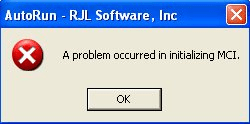
Why do I get the error "A problem occurred in initializing MCI."?
This error means Windows could not open the sound file you chose on the Sound tab. The file is usually an MP3 encoded in a way Windows' sound system (MCI) does not support, or it is damaged.
Check the file
Find the sound file in your Base Folder and double-click it. If it does not play on your own PC, the file is damaged; export it again from the original.
Convert it to WAV
If it plays in other programs but AutoRun Wizard shows this error, convert it to a standard WAV file, which always works:
- Audacity (free, from audacityteam.org): open the MP3, then choose File > Export Audio and pick WAV (16-bit PCM).
- VLC media player (free, from videolan.org): Media > Convert / Save, then choose an audio profile with WAV.
Copy the new .wav file into your Base Folder, select it on the Sound tab, save and test. WAV files are larger than MP3s, so trim long silences and keep the clip short; a sound that plays during your splash screen rarely needs more than 10 to 20 seconds.
Try it yourself. My AutoRun is free to download and fully functional - see how it handles this on your own USB drive or CD.
Download & Try Free