USB disk or CD EULA
More FeaturesLoad Custom Eula
With My AutoRun you can display a EULA (end user license agreement) when your autorun launches. This appears when the USB or cd is inserted and the user is prompted with your custom agreement.
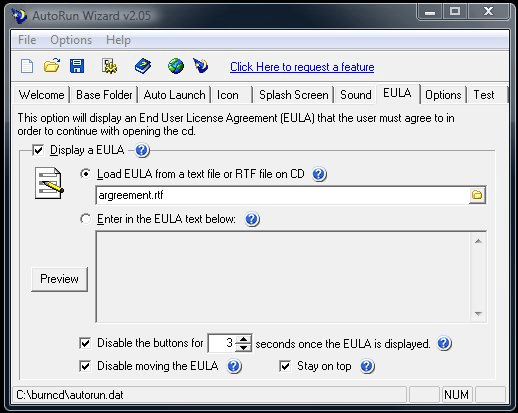
Load the EULA from a file
Selecting to load the EULA from a file allows you to have a separate file on the USB or CD-ROM that contains your license agreement. Then My AutoRun loads, it will read your file and display the contents to the user. Optionally you can type in the Eula and save it with your autorun configuration file. Either way, the Eula is displayed the same way to the user.
EULA display
We allow you to set how the EULA is displayed to the user. The Eula always displays 2 buttons: I Agreee and I Disagree, with the the disagree button as the default. You can configure your Eula to disable the buttons for X seconds to force the user to look at your Eula. You can also disable moving the Eula so that it stays in front of your users face. Likewise with the Stay on Top option, if you want to keep it in front of everything the user is doing.
Everything on this page works in the free download. Build and test your first autorun in minutes.